My next goal was to get DataWrangling's update scripts working. Because of my lack of knowledge about Hadoop and Hive, I've encountered a LOT of errors, made a lot of mistakes, and lost many hours normally devoted to sleep. Ah well..what's a techy supposed to do? Of course, encountering problems is a great way to learn and I had problems aplenty. It was well worth the effort.
I first installed Cloudera Hadoop in pseudo-distributed mode. This was great for testing out DW's map/reduce and python scripts BEFORE you fire up multiple EC2 instances that will cost you. Ahem.
I spent about a week's worth of nights figuring out the scripts. I rewrote them to make them easier to use. Once I get a bit of time, I will post them in a more readable format. Once I got those scripts working, I updated my hadoop.properties file in order to munge through the big dataset on EC2.
INSERT AMAZON EC2 EXPERIENCE HERE
I spent too much money on what I should have been doing in my unit test environment first.
*** end EXPERIENCE ***
The only trouble I had is that once I was finished with the EC2 configuration, I didn't know how to revert back to the pseudo-distributed config. Eventually I'll figure this out, but I had to reinstall Hadoop to clear out the config to get back to pseudo mode.
Below I list the things I learned this week.
pseudo-distributed mode
The quickest way to reset the Hadoop configuration in order to get back to pseudo mode from EC2 mode was to reinstall Hadoop.
Make sure your environment is setup properly!
PATH=$PATH:/usr/local/apache-maven-3.0.3/bin
export PATH
export HADOOP_HOME=/usr/lib/hadoop-0.20
#export HADOOP_ROOT_LOGGER=DEBUG,console
export HIVE_HOME=/usr/lib/hive
export MYBUCKET=trendingtopics
export MYSERVER=linux-z6tw
export MAILTO=cacasododom@gmail.com
export JAVA_HOME=/usr/java/jdk1.6.0_24/
export AWS_ACCESS_KEY_ID="DSRMMT"
export AWS_SECRET_ACCESS_KEY="zKpxhQxBoA5jOxZk"
In my scripts, I had to add the AWS access id/secret key to the URL for S3 access:
s3n://accessid:secretkey@$MYBUCKET/...
Debugging
Use Hive Logs
..to tell you what the hell is going wrong with Hive.
linux-z6tw:/var/lib/hive # ll /tmp/root/hive.log
-rw-r--r-- 1 root root 503689 Apr 8 15:23 /tmp/root/hive.log
linux-z6tw:/var/lib/hive # date
Fri Apr 8 15:28:37 EDT 2011
linux-z6tw:/var/lib/hive # tail /tmp/root/hive.log
at java.lang.reflect.Method.invoke(Method.java:597)
at org.apache.hadoop.util.RunJar.main(RunJar.java:186)
enable Hadoop Debugger for streaming errors
HADOOP_ROOT_LOGGER=DEBUG,console
Like so:
11/04/08 16:42:06 DEBUG streaming.StreamJob: Error in streaming job
java.lang.IllegalArgumentException: AWS Access Key ID and Secret Access Key must be specified as the username or password
By default, Hadoop Streaming does not spit out very clear errors. Once debug mode is enable, the message that pops from hadoop-streaming is fairly self-explanatory.
Errors
FAILED: Error in semantic analysis: line 3:17 Invalid Path 'outputStage1': source contains directory: hdfs://ec2-184-73-137-122.compute-1.amazonaws.com/user/root/outputStage1/_logs
You must delete the _logs directory
ERROR DataNucleus.Plugin
>> (Log4JLogger.java:error(115)) - Bundle "org.eclipse.jdt.core" requires
>> "org.eclipse.core.resources" but it cannot be resolve
Corrupt Hive Metastore?
Maybe move/delete metastore to resolve unknown issues.
linux-z6tw:~ # ll /var/lib/hive/metastore/
total 16
-rw-r--r-- 1 root root 354 Apr 8 15:52 derby.log
drwxr-xr-x 5 root root 4096 Apr 8 15:58 metastore_db
drwxr-xr-x 5 root root 4096 Apr 8 15:51 metastore_dbBACKUP
drwxrwxrwt 3 root root 4096 Apr 8 14:38 scripts
Make sure you don't have another hive CLI session open..
Don't have two command line Hive interfaces (CLI) up when trying to add/drop/delete tables,
or you'll get strange failures, like this:
"DROPing redirect_table"
FAILED: Error in semantic analysis: Table not found redirect_table
FAILED: Error in semantic analysis: Unable to fetch table daily_trends
For LOAD DATA LOCAL INFILE calls, use --local-infile command line arg
mysql -u user -p --local-infile
Otherwise, you'd get:
ERROR 1148 (42000): The used command is not allowed with this MySQL version
DataWrangling's reducer2 seems to need the exact number of logfiles you're munging
-reducer "daily_timelines.py reducer2 1" \
Reference
http://hadoop.apache.org/common/docs/r0.20.2/quickstart.html
Running a multi-node Hadoop cluster
Cloudera Pseudo-Distributed Mode
Showing posts with label cloudera. Show all posts
Showing posts with label cloudera. Show all posts
Thursday, April 7, 2011

Friday, April 1, 2011
Cloudera for Hadoop..the errors
Following DataWrangling's prerequisites for the TrendingTopics data-driven website, I got myself an Amazon EC2 account. From the selection of virtual machine images that Amazon shows you and mapping them to the Cloudera Quick Start Guide, I decided to first setup a virtual machine instance of SUSE Linux Enterprise Server 11G, 64-bit in VMware Player. I did this so that I wouldn't waste any money on EC2 if I encountered any installation glitches. Which of course, I did.
SUSE Enterprise Linux is a very nice distribution..I hadn't used it before. Novell has kept the desktop very clean as opposed to OpenSuSE's choice of KDE for 11.4..ugh! YaST is a very nicely integrated system management tool. Also, the installation into VMware Player was quick..about 15 minutes from the install DVD. There were two ISO DVDs, the base install only required DVD1. Also, the Sun Java JDK is a prereq here, so I downloaded and installed that.
There are a few tasks to accomplish:
1) install the Cloudera repository
2) install Hadoop in pseudo-distributed mode (hadoop-0.20-conf-pseudo) + hadoop-hive
3) start the Hadoop services
4) test
I got hung up a few places:
1) install the rpm, not the bin. One SUSE Enterprise Linux 64-bit, it'd be:
sudo rpm -Uvh ./jdk-6u24-linux-amd64.rpm
2) the Cloudera documentation sends you to the wrong location for the repository file for SUSE 64-bit. It should be:
http://archive.cloudera.com/sles/11/x86_64/cdh/cloudera-cdh3.repo
(also, Cloudera's ami-8759bfee is out of date: old-releases.ubuntu.com)
3) the namenode service crapped out:
metrics.MetricsUtil: Unable to obtain hostName
This was due to the fact that the hostname of my local machine was not recognized. I added an entry into /etc/hosts to resolve this.
3) the test jar for calculating the value of pi failed:
sodo@linux-8u67:/var/log/hadoop-0.20> hadoop jar /usr/lib/hadoop/hadoop-*-examples.jar pi 2 100000
Number of Maps = 2
Samples per Map = 100000
Wrote input for Map #0
Wrote input for Map #1
Starting Job
11/03/24 16:28:49 INFO ipc.Client: Retrying connect to server: localhost/127.0.0.1:8021. Already tried 0 time(s).
For some reason, the mapReduce jobtracker service was not up and running on port 8021. This issue turned out to be related to the timing of when the other Hadoop services start. If I restart the Hadoop jobtracker service on its own, the service starts just fine:
sodo@linux-8u67:/etc/hadoop/conf> sudo /etc/init.d/hadoop-0.20-jobtracker restart
Stopping Hadoop jobtracker daemon (hadoop-jobtracker): done
no jobtracker to stop
Starting Hadoop jobtracker daemon (hadoop-jobtracker): done
starting jobtracker, logging to /usr/lib/hadoop-0.20/logs/hadoop-hadoop-jobtracker-linux-8u67.out
4) After package installs:
insserv: Script jexec is broken: incomplete LSB comment
Sun Java problem. Workaround here: https://bugzilla.novell.com/show_bug.cgi?id=504596#c14
5) insserv: FATAL: service syslog is missed in the runlevels 4 to use service hadoop-0.20-*
Workaround here or here.
6) FAILED: Unknown exception : org.apache.hadoop.ipc.RemoteException: org.apache.hadoop.hdfs.server.namenode.SafeModeException: Cannot create directory /tmp/hive-hadoop. Name node is in safe mode
I did not wait long enough after hadoop services were started. I gave them a couple minutes to cook and then my job ran.
7) hdfs.DFSClient: Exception in createBlockOutputStream java.net.SocketException: Protocol not available
I had this java stack installed:
linux-z6tw:/> java -version
java version "1.6.0_20"
OpenJDK Runtime Environment (IcedTea6 1.9.7) (suse-1.2.1-x86_64)
OpenJDK 64-Bit Server VM (build 19.0-b09, mixed mode)
I yanked out the java-1_6_0-openjdk* version:
linux-z6tw:~> sudo zypper remove java-1_6_0-openjdk*
Loading repository data...
Reading installed packages...
Resolving package dependencies...
The following NEW package is going to be installed:
java-1_6_0-sun
The following packages are going to be REMOVED:
java-1_6_0-openjdk java-1_6_0-openjdk-plugin
Retrieving package java-1_6_0-sun-1.6.0.u23-3.3.x86_64 (1/1), 20.8 MiB (88.6 MiB unpacked)
Retrieving: java-1_6_0-sun-1.6.0.u23-3.3.x86_64.rpm [done (1.6 MiB/s)]
Removing java-1_6_0-openjdk-plugin-1.6.0.0_b20.1.9.7-1.2.1 [done]
Removing java-1_6_0-openjdk-1.6.0.0_b20.1.9.7-1.2.1 [done]
So that only the Sun JDK was left:
linux-z6tw:~> java -version
java version "1.6.0_23"
Java(TM) SE Runtime Environment (build 1.6.0_23-b05)
Java HotSpot(TM) 64-Bit Server VM (build 19.0-b09, mixed mode)
And Hadoop is now running MapReduce jobs!
sodo@linux-8u67:~/Desktop> hadoop jar /usr/lib/hadoop/hadoop-*-examples.jar pi 2 100000
Number of Maps = 2
Samples per Map = 100000
Wrote input for Map #0
Wrote input for Map #1
Starting Job
11/03/24 17:43:13 INFO mapred.FileInputFormat: Total input paths to process : 2
11/03/24 17:43:14 INFO mapred.JobClient: Running job: job_201103241738_0001
11/03/24 17:43:15 INFO mapred.JobClient: map 0% reduce 0%
11/03/24 17:43:23 INFO mapred.JobClient: map 100% reduce 0%
11/03/24 17:43:31 INFO mapred.JobClient: map 100% reduce 100%
11/03/24 17:43:31 INFO mapred.JobClient: Job complete: job_201103241738_0001
11/03/24 17:43:31 INFO mapred.JobClient: Counters: 23
11/03/24 17:43:31 INFO mapred.JobClient: Job Counters
11/03/24 17:43:31 INFO mapred.JobClient: Launched reduce tasks=1
11/03/24 17:43:31 INFO mapred.JobClient: SLOTS_MILLIS_MAPS=11869
11/03/24 17:43:31 INFO mapred.JobClient: Total time spent by all reduces waiting after reserving slots (ms)=0
11/03/24 17:43:31 INFO mapred.JobClient: Total time spent by all maps waiting after reserving slots (ms)=0
11/03/24 17:43:31 INFO mapred.JobClient: Launched map tasks=2
11/03/24 17:43:31 INFO mapred.JobClient: Data-local map tasks=2
11/03/24 17:43:31 INFO mapred.JobClient: SLOTS_MILLIS_REDUCES=8403
11/03/24 17:43:31 INFO mapred.JobClient: FileSystemCounters
11/03/24 17:43:31 INFO mapred.JobClient: FILE_BYTES_READ=50
11/03/24 17:43:31 INFO mapred.JobClient: HDFS_BYTES_READ=472
11/03/24 17:43:31 INFO mapred.JobClient: FILE_BYTES_WRITTEN=156550
11/03/24 17:43:31 INFO mapred.JobClient: HDFS_BYTES_WRITTEN=215
11/03/24 17:43:31 INFO mapred.JobClient: Map-Reduce Framework
11/03/24 17:43:31 INFO mapred.JobClient: Reduce input groups=2
11/03/24 17:43:31 INFO mapred.JobClient: Combine output records=0
11/03/24 17:43:31 INFO mapred.JobClient: Map input records=2
11/03/24 17:43:31 INFO mapred.JobClient: Reduce shuffle bytes=28
11/03/24 17:43:31 INFO mapred.JobClient: Reduce output records=0
11/03/24 17:43:31 INFO mapred.JobClient: Spilled Records=8
11/03/24 17:43:31 INFO mapred.JobClient: Map output bytes=36
11/03/24 17:43:31 INFO mapred.JobClient: Map input bytes=48
11/03/24 17:43:31 INFO mapred.JobClient: Combine input records=0
11/03/24 17:43:31 INFO mapred.JobClient: Map output records=4
11/03/24 17:43:31 INFO mapred.JobClient: SPLIT_RAW_BYTES=236
11/03/24 17:43:31 INFO mapred.JobClient: Reduce input records=4
Job Finished in 18.177 seconds
Estimated value of Pi is 3.14118000000000000000
Neato. More to come..
References
Hadoop Default Ports
Unable to Obtain HostName error
Cloudera Documentation
Official OpenSuSE Documentation
Unofficial OpenSuSE Documentation
OpenSuSE Package Search
AddRepos
http://download.opensuse.org/distribution/11.1/repo/non-oss/
http://download.opensuse.org/distribution/11.1/repo/oss/
SUSE Enterprise Linux is a very nice distribution..I hadn't used it before. Novell has kept the desktop very clean as opposed to OpenSuSE's choice of KDE for 11.4..ugh! YaST is a very nicely integrated system management tool. Also, the installation into VMware Player was quick..about 15 minutes from the install DVD. There were two ISO DVDs, the base install only required DVD1. Also, the Sun Java JDK is a prereq here, so I downloaded and installed that.
There are a few tasks to accomplish:
1) install the Cloudera repository
2) install Hadoop in pseudo-distributed mode (hadoop-0.20-conf-pseudo) + hadoop-hive
3) start the Hadoop services
4) test
I got hung up a few places:
1) install the rpm, not the bin. One SUSE Enterprise Linux 64-bit, it'd be:
sudo rpm -Uvh ./jdk-6u24-linux-amd64.rpm
2) the Cloudera documentation sends you to the wrong location for the repository file for SUSE 64-bit. It should be:
http://archive.cloudera.com/sles/11/x86_64/cdh/cloudera-cdh3.repo
(also, Cloudera's ami-8759bfee is out of date: old-releases.ubuntu.com)
3) the namenode service crapped out:
metrics.MetricsUtil: Unable to obtain hostName
This was due to the fact that the hostname of my local machine was not recognized. I added an entry into /etc/hosts to resolve this.
3) the test jar for calculating the value of pi failed:
sodo@linux-8u67:/var/log/hadoop-0.20> hadoop jar /usr/lib/hadoop/hadoop-*-examples.jar pi 2 100000
Number of Maps = 2
Samples per Map = 100000
Wrote input for Map #0
Wrote input for Map #1
Starting Job
11/03/24 16:28:49 INFO ipc.Client: Retrying connect to server: localhost/127.0.0.1:8021. Already tried 0 time(s).
For some reason, the mapReduce jobtracker service was not up and running on port 8021. This issue turned out to be related to the timing of when the other Hadoop services start. If I restart the Hadoop jobtracker service on its own, the service starts just fine:
sodo@linux-8u67:/etc/hadoop/conf> sudo /etc/init.d/hadoop-0.20-jobtracker restart
Stopping Hadoop jobtracker daemon (hadoop-jobtracker): done
no jobtracker to stop
Starting Hadoop jobtracker daemon (hadoop-jobtracker): done
starting jobtracker, logging to /usr/lib/hadoop-0.20/logs/hadoop-hadoop-jobtracker-linux-8u67.out
4) After package installs:
insserv: Script jexec is broken: incomplete LSB comment
Sun Java problem. Workaround here: https://bugzilla.novell.com/show_bug.cgi?id=504596#c14
5) insserv: FATAL: service syslog is missed in the runlevels 4 to use service hadoop-0.20-*
Workaround here or here.
6) FAILED: Unknown exception : org.apache.hadoop.ipc.RemoteException: org.apache.hadoop.hdfs.server.namenode.SafeModeException: Cannot create directory /tmp/hive-hadoop. Name node is in safe mode
I did not wait long enough after hadoop services were started. I gave them a couple minutes to cook and then my job ran.
7) hdfs.DFSClient: Exception in createBlockOutputStream java.net.SocketException: Protocol not available
I had this java stack installed:
linux-z6tw:/> java -version
java version "1.6.0_20"
OpenJDK Runtime Environment (IcedTea6 1.9.7) (suse-1.2.1-x86_64)
OpenJDK 64-Bit Server VM (build 19.0-b09, mixed mode)
I yanked out the java-1_6_0-openjdk* version:
linux-z6tw:~> sudo zypper remove java-1_6_0-openjdk*
Loading repository data...
Reading installed packages...
Resolving package dependencies...
The following NEW package is going to be installed:
java-1_6_0-sun
The following packages are going to be REMOVED:
java-1_6_0-openjdk java-1_6_0-openjdk-plugin
Retrieving package java-1_6_0-sun-1.6.0.u23-3.3.x86_64 (1/1), 20.8 MiB (88.6 MiB unpacked)
Retrieving: java-1_6_0-sun-1.6.0.u23-3.3.x86_64.rpm [done (1.6 MiB/s)]
Removing java-1_6_0-openjdk-plugin-1.6.0.0_b20.1.9.7-1.2.1 [done]
Removing java-1_6_0-openjdk-1.6.0.0_b20.1.9.7-1.2.1 [done]
So that only the Sun JDK was left:
linux-z6tw:~> java -version
java version "1.6.0_23"
Java(TM) SE Runtime Environment (build 1.6.0_23-b05)
Java HotSpot(TM) 64-Bit Server VM (build 19.0-b09, mixed mode)
And Hadoop is now running MapReduce jobs!
sodo@linux-8u67:~/Desktop> hadoop jar /usr/lib/hadoop/hadoop-*-examples.jar pi 2 100000
Number of Maps = 2
Samples per Map = 100000
Wrote input for Map #0
Wrote input for Map #1
Starting Job
11/03/24 17:43:13 INFO mapred.FileInputFormat: Total input paths to process : 2
11/03/24 17:43:14 INFO mapred.JobClient: Running job: job_201103241738_0001
11/03/24 17:43:15 INFO mapred.JobClient: map 0% reduce 0%
11/03/24 17:43:23 INFO mapred.JobClient: map 100% reduce 0%
11/03/24 17:43:31 INFO mapred.JobClient: map 100% reduce 100%
11/03/24 17:43:31 INFO mapred.JobClient: Job complete: job_201103241738_0001
11/03/24 17:43:31 INFO mapred.JobClient: Counters: 23
11/03/24 17:43:31 INFO mapred.JobClient: Job Counters
11/03/24 17:43:31 INFO mapred.JobClient: Launched reduce tasks=1
11/03/24 17:43:31 INFO mapred.JobClient: SLOTS_MILLIS_MAPS=11869
11/03/24 17:43:31 INFO mapred.JobClient: Total time spent by all reduces waiting after reserving slots (ms)=0
11/03/24 17:43:31 INFO mapred.JobClient: Total time spent by all maps waiting after reserving slots (ms)=0
11/03/24 17:43:31 INFO mapred.JobClient: Launched map tasks=2
11/03/24 17:43:31 INFO mapred.JobClient: Data-local map tasks=2
11/03/24 17:43:31 INFO mapred.JobClient: SLOTS_MILLIS_REDUCES=8403
11/03/24 17:43:31 INFO mapred.JobClient: FileSystemCounters
11/03/24 17:43:31 INFO mapred.JobClient: FILE_BYTES_READ=50
11/03/24 17:43:31 INFO mapred.JobClient: HDFS_BYTES_READ=472
11/03/24 17:43:31 INFO mapred.JobClient: FILE_BYTES_WRITTEN=156550
11/03/24 17:43:31 INFO mapred.JobClient: HDFS_BYTES_WRITTEN=215
11/03/24 17:43:31 INFO mapred.JobClient: Map-Reduce Framework
11/03/24 17:43:31 INFO mapred.JobClient: Reduce input groups=2
11/03/24 17:43:31 INFO mapred.JobClient: Combine output records=0
11/03/24 17:43:31 INFO mapred.JobClient: Map input records=2
11/03/24 17:43:31 INFO mapred.JobClient: Reduce shuffle bytes=28
11/03/24 17:43:31 INFO mapred.JobClient: Reduce output records=0
11/03/24 17:43:31 INFO mapred.JobClient: Spilled Records=8
11/03/24 17:43:31 INFO mapred.JobClient: Map output bytes=36
11/03/24 17:43:31 INFO mapred.JobClient: Map input bytes=48
11/03/24 17:43:31 INFO mapred.JobClient: Combine input records=0
11/03/24 17:43:31 INFO mapred.JobClient: Map output records=4
11/03/24 17:43:31 INFO mapred.JobClient: SPLIT_RAW_BYTES=236
11/03/24 17:43:31 INFO mapred.JobClient: Reduce input records=4
Job Finished in 18.177 seconds
Estimated value of Pi is 3.14118000000000000000
Neato. More to come..
References
Hadoop Default Ports
Unable to Obtain HostName error
Cloudera Documentation
Official OpenSuSE Documentation
Unofficial OpenSuSE Documentation
OpenSuSE Package Search
AddRepos
http://download.opensuse.org/distribution/11.1/repo/non-oss/
http://download.opensuse.org/distribution/11.1/repo/oss/
Wednesday, March 30, 2011
whirr config, hadoop cmds, test mapreduce
Although the commands below are replicated in the Cloudera Whirr install doc, I find it helpful to document my own experiences, as I usually encounter errors not mentioned in the documentation.
Whirr Configuration
linux-z6tw:~> whirr version
Apache Whirr 0.3.0-CDH3B4
linux-z6tw:~> cat hadoop.properties
whirr.service-name=hadoop
whirr.cluster-name=myhadoopcluster
whirr.instance-templates=1 jt+nn,1 dn+tt
whirr.provider=ec2
whirr.identity=0TM8DSRMM
whirr.credential=VhmAq9QzCxzKpxhQxBoA5jO
whirr.private-key-file=${sys:user.home}/.ssh/id_rsa
whirr.public-key-file=${sys:user.home}/.ssh/id_rsa.pub
whirr.hadoop-install-runurl=cloudera/cdh/install
whirr.hadoop-configure-runurl=cloudera/cdh/post-configure
Launching a Whirr Cluster
linux-z6tw:~> whirr launch-cluster --config hadoop.properties
Bootstrapping cluster
Configuring template
Starting 1 node(s) with roles [tt, dn]
Configuring template
Starting 1 node(s) with roles [jt, nn]
Nodes started: [[id=us-east-1/i-c4e942ab, providerId=i-c4e942ab, tag=myhadoopcluster, name=null, location=[id=us-east-1d, scope=ZONE, description=us-east-1d, parent=us-east-1], uri=null, imageId=us-east-1/ami-2a1fec43, os=[name=null, family=amzn-linux, version=2011.02.1, arch=paravirtual, is64Bit=false, description=amzn-ami-us-east-1/amzn-ami-2011.02.1.i386.manifest.xml], userMetadata={}, state=RUNNING, privateAddresses=[10.116.209.9], publicAddresses=[50.17.125.68], hardware=[id=m1.small, providerId=m1.small, name=m1.small, processors=[[cores=1.0, speed=1.0]], ram=1740, volumes=[[id=null, type=LOCAL, size=10.0, device=/dev/sda1, durable=false, isBootDevice=true], [id=null, type=LOCAL, size=150.0, device=/dev/sda2, durable=false, isBootDevice=false]], supportsImage=Not(is64Bit())]]]
Nodes started: [[id=us-east-1/i-c0e942af, providerId=i-c0e942af, tag=myhadoopcluster, name=null, location=[id=us-east-1d, scope=ZONE, description=us-east-1d, parent=us-east-1], uri=null, imageId=us-east-1/ami-2a1fec43, os=[name=null, family=amzn-linux, version=2011.02.1, arch=paravirtual, is64Bit=false, description=amzn-ami-us-east-1/amzn-ami-2011.02.1.i386.manifest.xml], userMetadata={}, state=RUNNING, privateAddresses=[10.101.11.193], publicAddresses=[184.72.91.22], hardware=[id=m1.small, providerId=m1.small, name=m1.small, processors=[[cores=1.0, speed=1.0]], ram=1740, volumes=[[id=null, type=LOCAL, size=10.0, device=/dev/sda1, durable=false, isBootDevice=true], [id=null, type=LOCAL, size=150.0, device=/dev/sda2, durable=false, isBootDevice=false]], supportsImage=Not(is64Bit())]]]
Authorizing firewall
Running configuration script
Configuration script run completed
Running configuration script
Configuration script run completed
Completed configuration of myhadoopcluster
Web UI available at http://ec2-184-72-91-22.compute-1.amazonaws.com
Wrote Hadoop site file /home/sodo/.whirr/myhadoopcluster/hadoop-site.xml
Wrote Hadoop proxy script /home/sodo/.whirr/myhadoopcluster/hadoop-proxy.sh
Wrote instances file /home/sodo/.whirr/myhadoopcluster/instances
Started cluster of 2 instances
Cluster{instances=[Instance{roles=[jt, nn], publicAddress=/184.72.91.22, privateAddress=/10.101.11.193, id=us-east-1/i-c0e942af}, Instance{roles=[tt, dn], publicAddress=/50.17.125.68, privateAddress=/10.116.209.9, id=us-east-1/i-c4e942ab}], configuration={hadoop.job.ugi=root,root, mapred.job.tracker=ec2-184-72-91-22.compute-1.amazonaws.com:8021, hadoop.socks.server=localhost:6666, fs.s3n.awsAccessKeyId=058DSRMMTF, fs.s3.awsSecretAccessKey=VhmOHmAq9QzCxzKpxhQxBoA5jOxZksq62jpO5mbD, fs.s3.awsAccessKeyId=058DSRMMTF, hadoop.rpc.socket.factory.class.default=org.apache.hadoop.net.SocksSocketFactory, fs.default.name=hdfs://ec2-184-72-91-22.compute-1.amazonaws.com:8020/, fs.s3n.awsSecretAccessKey=VhmAq9QzCxzKpxhQxBoA5jOxZks}}
Update the local Hadoop configuration to use hadoop-site.xml
linux-z6tw:~> ls .whirr/myhadoopcluster/
hadoop-proxy.sh hadoop-site.xml instances
linux-z6tw:~> sudo cp -r /etc/hadoop-0.20/conf.empty /etc/hadoop-0.20/conf.whirr
root's password:
linux-z6tw:~> sudo rm -f /etc/hadoop-0.20/conf.whirr/*-site.xml
sudo rm -f /etc/hadoop-0.20/conf.whirr/*-site.xml
linux-z6tw:~> sudo cp ~/.whirr/myhadoopcluster/hadoop-site.xml /etc/hadoop-0.20/conf.whirr
linux-z6tw:/> sudo /usr/sbin/update-alternatives --install /etc/hadoop-0.20/conf hadoop-0.20-conf /etc/hadoop-0.20/conf.whirr 50
linux-z6tw:/> /usr/sbin/update-alternatives --display hadoop-0.20-conf
hadoop-0.20-conf - status is auto.
link currently points to /etc/hadoop-0.20/conf.whirr
/etc/hadoop-0.20/conf.empty - priority 10
/etc/hadoop-0.20/conf.pseudo - priority 30
/etc/hadoop-0.20/conf.whirr - priority 50
Current `best' version is /etc/hadoop-0.20/conf.whirr.
Running a Whirr Proxy
linux-z6tw:/> . ~/.whirr/myhadoopcluster/hadoop-proxy.sh
Running proxy to Hadoop cluster at ec2-50-17-36-127.compute-1.amazonaws.com. Use Ctrl-c to quit.
Warning: Permanently added 'ec2-50-17-36-127.compute-1.amazonaws.com,10.194.74.132' (RSA) to the list of known hosts.
Hadoop Commands
Error: You get this error if you don't have the proxy running:
linux-z6tw:/> hadoop fs -ls /
11/03/31 01:53:08 WARN conf.Configuration: DEPRECATED: hadoop-site.xml found in the classpath. Usage of hadoop-site.xml is deprecated. Instead use core-site.xml, mapred-site.xml and hdfs-site.xml to override properties of core-default.xml, mapred-default.xml and hdfs-default.xml respectively
11/03/31 01:53:10 INFO ipc.Client: Retrying connect to server: ec2-184-72-91-22.compute-1.amazonaws.com/184.72.91.22:8020. Already tried 0 time(s).
11/03/31 01:53:11 INFO ipc.Client: Retrying connect to server: ec2-184-72-91-22.compute-1.amazonaws.com/184.72.91.22:8020. Already tried 1 time(s).
11/03/31 01:53:12 INFO ipc.Client: Retrying connect to server: ec2-184-72-91-22.compute-1.amazonaws.com/184.72.91.22:8020. Already tried 2 time(s).
11/03/31 01:53:13 INFO ipc.Client: Retrying connect to server: ec2-184-72-91-22.compute-1.amazonaws.com/184.72.91.22:8020. Already tried 3 time(s).
11/03/31 01:53:14 INFO ipc.Client: Retrying connect to server: ec2-184-72-91-22.compute-1.amazonaws.com/184.72.91.22:8020. Already tried 4 time(s).
^Csodo@linux-z6tw:/>
linux-z6tw:~/.whirr/myhadoopcluster> hadoop fs -ls /
Found 4 items
drwxrwxrwx - hdfs supergroup 0 2011-03-31 01:43 /hadoop
drwxrwxrwx - hdfs supergroup 0 2011-03-31 01:43 /mnt
drwxrwxrwx - hdfs supergroup 0 2011-03-31 01:43 /tmp
drwxrwxrwx - hdfs supergroup 0 2011-03-31 01:43 /user
linux-z6tw:~> hadoop fs -mkdir input
linux-z6tw:~> hadoop fs -put /usr/lib/hadoop-0.20/LICENSE.txt input
linux-z6tw:~> hadoop fs -ls /user/sodo/input
Found 1 items
-rw-r--r-- 3 sodo supergroup 13366 2011-03-31 02:02 /user/sodo/input/LICENSE.txt
MapReduce Test
linux-z6tw:~> hadoop jar /usr/lib/hadoop-0.20/hadoop-examples-*.jar wordcount input output
11/03/31 02:07:53 INFO input.FileInputFormat: Total input paths to process : 1
11/03/31 02:07:54 INFO mapred.JobClient: Running job: job_201103310543_0001
11/03/31 02:07:55 INFO mapred.JobClient: map 0% reduce 0%
11/03/31 02:08:07 INFO mapred.JobClient: map 100% reduce 0%
11/03/31 02:08:23 INFO mapred.JobClient: map 100% reduce 100%
11/03/31 02:08:27 INFO mapred.JobClient: Job complete: job_201103310543_0001
11/03/31 02:08:27 INFO mapred.JobClient: Counters: 22
11/03/31 02:08:27 INFO mapred.JobClient: Job Counters
11/03/31 02:08:27 INFO mapred.JobClient: Launched reduce tasks=1
11/03/31 02:08:27 INFO mapred.JobClient: SLOTS_MILLIS_MAPS=12167
11/03/31 02:08:27 INFO mapred.JobClient: Total time spent by all reduces waiting after reserving slots (ms)=0
11/03/31 02:08:27 INFO mapred.JobClient: Total time spent by all maps waiting after reserving slots (ms)=0
11/03/31 02:08:27 INFO mapred.JobClient: Launched map tasks=1
11/03/31 02:08:27 INFO mapred.JobClient: Data-local map tasks=1
11/03/31 02:08:27 INFO mapred.JobClient: SLOTS_MILLIS_REDUCES=15843
11/03/31 02:08:27 INFO mapred.JobClient: FileSystemCounters
11/03/31 02:08:27 INFO mapred.JobClient: FILE_BYTES_READ=10206
11/03/31 02:08:27 INFO mapred.JobClient: HDFS_BYTES_READ=13508
11/03/31 02:08:27 INFO mapred.JobClient: FILE_BYTES_WRITTEN=114918
11/03/31 02:08:27 INFO mapred.JobClient: HDFS_BYTES_WRITTEN=7376
11/03/31 02:08:27 INFO mapred.JobClient: Map-Reduce Framework
11/03/31 02:08:27 INFO mapred.JobClient: Reduce input groups=714
11/03/31 02:08:27 INFO mapred.JobClient: Combine output records=714
11/03/31 02:08:27 INFO mapred.JobClient: Map input records=244
11/03/31 02:08:27 INFO mapred.JobClient: Reduce shuffle bytes=10206
11/03/31 02:08:27 INFO mapred.JobClient: Reduce output records=714
11/03/31 02:08:27 INFO mapred.JobClient: Spilled Records=1428
11/03/31 02:08:27 INFO mapred.JobClient: Map output bytes=19699
11/03/31 02:08:27 INFO mapred.JobClient: Combine input records=1887
11/03/31 02:08:27 INFO mapred.JobClient: Map output records=1887
11/03/31 02:08:27 INFO mapred.JobClient: SPLIT_RAW_BYTES=142
11/03/31 02:08:27 INFO mapred.JobClient: Reduce input records=714
More Hadoop Commands
linux-z6tw:~> hadoop fs -ls /user/sodo
Found 3 items
drwx------ - sodo supergroup 0 2011-03-31 02:04 /user/sodo/.staging
drwxr-xr-x - sodo supergroup 0 2011-03-31 02:02 /user/sodo/input
drwxrwxrwx - sodo supergroup 0 2011-03-31 02:04 /user/sodo/output
linux-z6tw:~> hadoop fs -ls /user/sodo/output
Found 3 items
-rw-r--r-- 3 sodo supergroup 0 2011-03-31 02:04 /user/sodo/output/_SUCCESS
drwxrwxrwx - sodo supergroup 0 2011-03-31 02:03 /user/sodo/output/_logs
-rw-r--r-- 3 sodo supergroup 7376 2011-03-31 02:04 /user/sodo/output/part-r-00000
linux-z6tw:~> hadoop fs -cat /user/sodo/output/part-* | head
"AS 3
"Contribution" 1
"Contributor" 1
"Derivative 1
"Legal 1
"License" 1
"License"); 1
"Licensor" 1
"NOTICE" 1
"Not 1
cat: Unable to write to output stream.
Verify SSH connectivity
sodo@linux-z6tw:~/trendingtopics> ssh ec2-user@ec2-204-236-240-136.compute-1.amazonaws.com
Last login: Sun Apr 3 15:35:18 2011 from c-69-248-248-90.hsd1.nj.comcast.net
__| __|_ ) Amazon Linux AMI
_| ( / Beta
___|\___|___|
See /usr/share/doc/system-release-2011.02 for latest release notes. :-)
[ec2-user@ip-10-114-102-177 ~]$ exit
logout
Connection to ec2-204-236-240-136.compute-1.amazonaws.com closed
Hadoop Update script
sodo@linux-z6tw:~/trendingtopics> cat ~/updateHadoopConfig.sh
#!/bin/bash -v
whirr version
cat hadoop.properties
echo "Launch the cluster..hit ENTER"
read ANSWER
whirr launch-cluster --config hadoop.properties
ls .whirr/myhadoopcluster/
echo "Update the local Hadoop configuration to use hadoop-site.xml..hit ENTER"
read ANSWER
sudo cp -r /etc/hadoop-0.20/conf.empty /etc/hadoop-0.20/conf.whirr
sudo rm -f /etc/hadoop-0.20/conf.whirr/*-site.xml
sudo cp ~/.whirr/myhadoopcluster/hadoop-site.xml /etc/hadoop-0.20/conf.whirr
sudo /usr/sbin/update-alternatives --install /etc/hadoop-0.20/conf hadoop-0.20-conf /etc/hadoop-0.20/conf.whirr 50
sudo /usr/sbin/update-alternatives --display hadoop-0.20-conf
echo "Now, run the proxy..hit ENTER"
read ANSWER
. ~/.whirr/myhadoopcluster/hadoop-proxy.sh
MapReduce Test Script
sfrase@linux-z6tw:~> cat mapReduceTestJob.sh
#!/bin/bash -v
hadoop fs -mkdir input
hadoop fs -put $HADOOP_HOME/LICENSE.txt input
hadoop jar $HADOOP_HOME/hadoop-examples-*.jar wordcount input output
hadoop fs -cat output/part-* | head
Reference
Hadoop Command Reference
Hadoop Streaming
How MapReduce Works
Whirr Configuration
linux-z6tw:~> whirr version
Apache Whirr 0.3.0-CDH3B4
linux-z6tw:~> cat hadoop.properties
whirr.service-name=hadoop
whirr.cluster-name=myhadoopcluster
whirr.instance-templates=1 jt+nn,1 dn+tt
whirr.provider=ec2
whirr.identity=0TM8DSRMM
whirr.credential=VhmAq9QzCxzKpxhQxBoA5jO
whirr.private-key-file=${sys:user.home}/.ssh/id_rsa
whirr.public-key-file=${sys:user.home}/.ssh/id_rsa.pub
whirr.hadoop-install-runurl=cloudera/cdh/install
whirr.hadoop-configure-runurl=cloudera/cdh/post-configure
Launching a Whirr Cluster
linux-z6tw:~> whirr launch-cluster --config hadoop.properties
Bootstrapping cluster
Configuring template
Starting 1 node(s) with roles [tt, dn]
Configuring template
Starting 1 node(s) with roles [jt, nn]
Nodes started: [[id=us-east-1/i-c4e942ab, providerId=i-c4e942ab, tag=myhadoopcluster, name=null, location=[id=us-east-1d, scope=ZONE, description=us-east-1d, parent=us-east-1], uri=null, imageId=us-east-1/ami-2a1fec43, os=[name=null, family=amzn-linux, version=2011.02.1, arch=paravirtual, is64Bit=false, description=amzn-ami-us-east-1/amzn-ami-2011.02.1.i386.manifest.xml], userMetadata={}, state=RUNNING, privateAddresses=[10.116.209.9], publicAddresses=[50.17.125.68], hardware=[id=m1.small, providerId=m1.small, name=m1.small, processors=[[cores=1.0, speed=1.0]], ram=1740, volumes=[[id=null, type=LOCAL, size=10.0, device=/dev/sda1, durable=false, isBootDevice=true], [id=null, type=LOCAL, size=150.0, device=/dev/sda2, durable=false, isBootDevice=false]], supportsImage=Not(is64Bit())]]]
Nodes started: [[id=us-east-1/i-c0e942af, providerId=i-c0e942af, tag=myhadoopcluster, name=null, location=[id=us-east-1d, scope=ZONE, description=us-east-1d, parent=us-east-1], uri=null, imageId=us-east-1/ami-2a1fec43, os=[name=null, family=amzn-linux, version=2011.02.1, arch=paravirtual, is64Bit=false, description=amzn-ami-us-east-1/amzn-ami-2011.02.1.i386.manifest.xml], userMetadata={}, state=RUNNING, privateAddresses=[10.101.11.193], publicAddresses=[184.72.91.22], hardware=[id=m1.small, providerId=m1.small, name=m1.small, processors=[[cores=1.0, speed=1.0]], ram=1740, volumes=[[id=null, type=LOCAL, size=10.0, device=/dev/sda1, durable=false, isBootDevice=true], [id=null, type=LOCAL, size=150.0, device=/dev/sda2, durable=false, isBootDevice=false]], supportsImage=Not(is64Bit())]]]
Authorizing firewall
Running configuration script
Configuration script run completed
Running configuration script
Configuration script run completed
Completed configuration of myhadoopcluster
Web UI available at http://ec2-184-72-91-22.compute-1.amazonaws.com
Wrote Hadoop site file /home/sodo/.whirr/myhadoopcluster/hadoop-site.xml
Wrote Hadoop proxy script /home/sodo/.whirr/myhadoopcluster/hadoop-proxy.sh
Wrote instances file /home/sodo/.whirr/myhadoopcluster/instances
Started cluster of 2 instances
Cluster{instances=[Instance{roles=[jt, nn], publicAddress=/184.72.91.22, privateAddress=/10.101.11.193, id=us-east-1/i-c0e942af}, Instance{roles=[tt, dn], publicAddress=/50.17.125.68, privateAddress=/10.116.209.9, id=us-east-1/i-c4e942ab}], configuration={hadoop.job.ugi=root,root, mapred.job.tracker=ec2-184-72-91-22.compute-1.amazonaws.com:8021, hadoop.socks.server=localhost:6666, fs.s3n.awsAccessKeyId=058DSRMMTF, fs.s3.awsSecretAccessKey=VhmOHmAq9QzCxzKpxhQxBoA5jOxZksq62jpO5mbD, fs.s3.awsAccessKeyId=058DSRMMTF, hadoop.rpc.socket.factory.class.default=org.apache.hadoop.net.SocksSocketFactory, fs.default.name=hdfs://ec2-184-72-91-22.compute-1.amazonaws.com:8020/, fs.s3n.awsSecretAccessKey=VhmAq9QzCxzKpxhQxBoA5jOxZks}}
Update the local Hadoop configuration to use hadoop-site.xml
linux-z6tw:~> ls .whirr/myhadoopcluster/
hadoop-proxy.sh hadoop-site.xml instances
linux-z6tw:~> sudo cp -r /etc/hadoop-0.20/conf.empty /etc/hadoop-0.20/conf.whirr
root's password:
linux-z6tw:~> sudo rm -f /etc/hadoop-0.20/conf.whirr/*-site.xml
sudo rm -f /etc/hadoop-0.20/conf.whirr/*-site.xml
linux-z6tw:~> sudo cp ~/.whirr/myhadoopcluster/hadoop-site.xml /etc/hadoop-0.20/conf.whirr
linux-z6tw:/> sudo /usr/sbin/update-alternatives --install /etc/hadoop-0.20/conf hadoop-0.20-conf /etc/hadoop-0.20/conf.whirr 50
linux-z6tw:/> /usr/sbin/update-alternatives --display hadoop-0.20-conf
hadoop-0.20-conf - status is auto.
link currently points to /etc/hadoop-0.20/conf.whirr
/etc/hadoop-0.20/conf.empty - priority 10
/etc/hadoop-0.20/conf.pseudo - priority 30
/etc/hadoop-0.20/conf.whirr - priority 50
Current `best' version is /etc/hadoop-0.20/conf.whirr.
Running a Whirr Proxy
linux-z6tw:/> . ~/.whirr/myhadoopcluster/hadoop-proxy.sh
Running proxy to Hadoop cluster at ec2-50-17-36-127.compute-1.amazonaws.com. Use Ctrl-c to quit.
Warning: Permanently added 'ec2-50-17-36-127.compute-1.amazonaws.com,10.194.74.132' (RSA) to the list of known hosts.
Hadoop Commands
Error: You get this error if you don't have the proxy running:
linux-z6tw:/> hadoop fs -ls /
11/03/31 01:53:08 WARN conf.Configuration: DEPRECATED: hadoop-site.xml found in the classpath. Usage of hadoop-site.xml is deprecated. Instead use core-site.xml, mapred-site.xml and hdfs-site.xml to override properties of core-default.xml, mapred-default.xml and hdfs-default.xml respectively
11/03/31 01:53:10 INFO ipc.Client: Retrying connect to server: ec2-184-72-91-22.compute-1.amazonaws.com/184.72.91.22:8020. Already tried 0 time(s).
11/03/31 01:53:11 INFO ipc.Client: Retrying connect to server: ec2-184-72-91-22.compute-1.amazonaws.com/184.72.91.22:8020. Already tried 1 time(s).
11/03/31 01:53:12 INFO ipc.Client: Retrying connect to server: ec2-184-72-91-22.compute-1.amazonaws.com/184.72.91.22:8020. Already tried 2 time(s).
11/03/31 01:53:13 INFO ipc.Client: Retrying connect to server: ec2-184-72-91-22.compute-1.amazonaws.com/184.72.91.22:8020. Already tried 3 time(s).
11/03/31 01:53:14 INFO ipc.Client: Retrying connect to server: ec2-184-72-91-22.compute-1.amazonaws.com/184.72.91.22:8020. Already tried 4 time(s).
^Csodo@linux-z6tw:/>
linux-z6tw:~/.whirr/myhadoopcluster> hadoop fs -ls /
Found 4 items
drwxrwxrwx - hdfs supergroup 0 2011-03-31 01:43 /hadoop
drwxrwxrwx - hdfs supergroup 0 2011-03-31 01:43 /mnt
drwxrwxrwx - hdfs supergroup 0 2011-03-31 01:43 /tmp
drwxrwxrwx - hdfs supergroup 0 2011-03-31 01:43 /user
linux-z6tw:~> hadoop fs -mkdir input
linux-z6tw:~> hadoop fs -put /usr/lib/hadoop-0.20/LICENSE.txt input
linux-z6tw:~> hadoop fs -ls /user/sodo/input
Found 1 items
-rw-r--r-- 3 sodo supergroup 13366 2011-03-31 02:02 /user/sodo/input/LICENSE.txt
MapReduce Test
linux-z6tw:~> hadoop jar /usr/lib/hadoop-0.20/hadoop-examples-*.jar wordcount input output
11/03/31 02:07:53 INFO input.FileInputFormat: Total input paths to process : 1
11/03/31 02:07:54 INFO mapred.JobClient: Running job: job_201103310543_0001
11/03/31 02:07:55 INFO mapred.JobClient: map 0% reduce 0%
11/03/31 02:08:07 INFO mapred.JobClient: map 100% reduce 0%
11/03/31 02:08:23 INFO mapred.JobClient: map 100% reduce 100%
11/03/31 02:08:27 INFO mapred.JobClient: Job complete: job_201103310543_0001
11/03/31 02:08:27 INFO mapred.JobClient: Counters: 22
11/03/31 02:08:27 INFO mapred.JobClient: Job Counters
11/03/31 02:08:27 INFO mapred.JobClient: Launched reduce tasks=1
11/03/31 02:08:27 INFO mapred.JobClient: SLOTS_MILLIS_MAPS=12167
11/03/31 02:08:27 INFO mapred.JobClient: Total time spent by all reduces waiting after reserving slots (ms)=0
11/03/31 02:08:27 INFO mapred.JobClient: Total time spent by all maps waiting after reserving slots (ms)=0
11/03/31 02:08:27 INFO mapred.JobClient: Launched map tasks=1
11/03/31 02:08:27 INFO mapred.JobClient: Data-local map tasks=1
11/03/31 02:08:27 INFO mapred.JobClient: SLOTS_MILLIS_REDUCES=15843
11/03/31 02:08:27 INFO mapred.JobClient: FileSystemCounters
11/03/31 02:08:27 INFO mapred.JobClient: FILE_BYTES_READ=10206
11/03/31 02:08:27 INFO mapred.JobClient: HDFS_BYTES_READ=13508
11/03/31 02:08:27 INFO mapred.JobClient: FILE_BYTES_WRITTEN=114918
11/03/31 02:08:27 INFO mapred.JobClient: HDFS_BYTES_WRITTEN=7376
11/03/31 02:08:27 INFO mapred.JobClient: Map-Reduce Framework
11/03/31 02:08:27 INFO mapred.JobClient: Reduce input groups=714
11/03/31 02:08:27 INFO mapred.JobClient: Combine output records=714
11/03/31 02:08:27 INFO mapred.JobClient: Map input records=244
11/03/31 02:08:27 INFO mapred.JobClient: Reduce shuffle bytes=10206
11/03/31 02:08:27 INFO mapred.JobClient: Reduce output records=714
11/03/31 02:08:27 INFO mapred.JobClient: Spilled Records=1428
11/03/31 02:08:27 INFO mapred.JobClient: Map output bytes=19699
11/03/31 02:08:27 INFO mapred.JobClient: Combine input records=1887
11/03/31 02:08:27 INFO mapred.JobClient: Map output records=1887
11/03/31 02:08:27 INFO mapred.JobClient: SPLIT_RAW_BYTES=142
11/03/31 02:08:27 INFO mapred.JobClient: Reduce input records=714
More Hadoop Commands
linux-z6tw:~> hadoop fs -ls /user/sodo
Found 3 items
drwx------ - sodo supergroup 0 2011-03-31 02:04 /user/sodo/.staging
drwxr-xr-x - sodo supergroup 0 2011-03-31 02:02 /user/sodo/input
drwxrwxrwx - sodo supergroup 0 2011-03-31 02:04 /user/sodo/output
linux-z6tw:~> hadoop fs -ls /user/sodo/output
Found 3 items
-rw-r--r-- 3 sodo supergroup 0 2011-03-31 02:04 /user/sodo/output/_SUCCESS
drwxrwxrwx - sodo supergroup 0 2011-03-31 02:03 /user/sodo/output/_logs
-rw-r--r-- 3 sodo supergroup 7376 2011-03-31 02:04 /user/sodo/output/part-r-00000
linux-z6tw:~> hadoop fs -cat /user/sodo/output/part-* | head
"AS 3
"Contribution" 1
"Contributor" 1
"Derivative 1
"Legal 1
"License" 1
"License"); 1
"Licensor" 1
"NOTICE" 1
"Not 1
cat: Unable to write to output stream.
Verify SSH connectivity
sodo@linux-z6tw:~/trendingtopics> ssh ec2-user@ec2-204-236-240-136.compute-1.amazonaws.com
Last login: Sun Apr 3 15:35:18 2011 from c-69-248-248-90.hsd1.nj.comcast.net
__| __|_ ) Amazon Linux AMI
_| ( / Beta
___|\___|___|
See /usr/share/doc/system-release-2011.02 for latest release notes. :-)
[ec2-user@ip-10-114-102-177 ~]$ exit
logout
Connection to ec2-204-236-240-136.compute-1.amazonaws.com closed
Hadoop Update script
sodo@linux-z6tw:~/trendingtopics> cat ~/updateHadoopConfig.sh
#!/bin/bash -v
whirr version
cat hadoop.properties
echo "Launch the cluster..hit ENTER"
read ANSWER
whirr launch-cluster --config hadoop.properties
ls .whirr/myhadoopcluster/
echo "Update the local Hadoop configuration to use hadoop-site.xml..hit ENTER"
read ANSWER
sudo cp -r /etc/hadoop-0.20/conf.empty /etc/hadoop-0.20/conf.whirr
sudo rm -f /etc/hadoop-0.20/conf.whirr/*-site.xml
sudo cp ~/.whirr/myhadoopcluster/hadoop-site.xml /etc/hadoop-0.20/conf.whirr
sudo /usr/sbin/update-alternatives --install /etc/hadoop-0.20/conf hadoop-0.20-conf /etc/hadoop-0.20/conf.whirr 50
sudo /usr/sbin/update-alternatives --display hadoop-0.20-conf
echo "Now, run the proxy..hit ENTER"
read ANSWER
. ~/.whirr/myhadoopcluster/hadoop-proxy.sh
MapReduce Test Script
sfrase@linux-z6tw:~> cat mapReduceTestJob.sh
#!/bin/bash -v
hadoop fs -mkdir input
hadoop fs -put $HADOOP_HOME/LICENSE.txt input
hadoop jar $HADOOP_HOME/hadoop-examples-*.jar wordcount input output
hadoop fs -cat output/part-* | head
Reference
Hadoop Command Reference
Hadoop Streaming
How MapReduce Works
Saturday, March 26, 2011
Cloudera for Hadoop, Beta 3 install and Whirr
I needed a test bed, so I fired up a micro OpenSuSE 11.4 instance on EC2 as it is relatively cheap (0.02 per Micro Instance, at the time of this writing). I'll build a VM for this purpose later, but it is late in the evening and I just want to get something working.
Once I had a vm running, I then went through the install docs and got both Cloudera for Hadoop Beta 3 and Whirr installed. Finally, I was able to fire up a cluster using Whirr. I describe Whirr configuration, Hadoop commands and perform a quick MapReduce test in a follow-up post.
Cloudera for Hadoop Beta 3
Following https://docs.cloudera.com/display/DOC/CDH3+Quick+Start+Guide
Following instructions here..
https://wiki.cloudera.com/display/DOC/Whirr+Installation
Whirr Notes
ip-10-212-121-180:~ # cat .bashrc
alias whirr='java -jar /usr/lib/whirr/whirr-cli-0.3.0-CDH3B4.jar'
alias whirr-ec2='whirr --identity=058DSRMMTFQMQRER2 --credential=VHmAq9QzCxzKpxhQxBoA5jOxZksq62jpO5mbD'
ip-10-212-121-180:~ # cat .bash_profile
export WHIRR_HOME=/usr/lib/whirr
export AWS_ACCESS_KEY_ID="058DSRMMT"
export AWS_SECRET_ACCESS_KEY="VHmAq9QzCxzKpxhQxBoA5jOxZks"
Hadoop Properties
ip-10-212-121-180:~ # cat hadoop.properties
whirr.cluster-name=myhadoopcluster
whirr.instance-templates=1 jt+nn,1 dn+tt
whirr.provider=ec2
whirr.identity=${env:AWS_ACCESS_KEY_ID}
whirr.credential=${env:AWS_SECRET_ACCESS_KEY}
whirr.private-key-file=${sys:user.home}/.ssh/id_rsa
whirr.public-key-file=${sys:user.home}/.ssh/id_rsa.pub
Passphraseless SSH for Localhost
ip-10-212-121-180:~ # ssh-keygen -t rsa
Generating public/private rsa key pair.
Enter file in which to save the key (/root/.ssh/id_rsa):
Enter passphrase (empty for no passphrase):
Enter same passphrase again:
Your identification has been saved in /root/.ssh/id_rsa.
Your public key has been saved in /root/.ssh/id_rsa.pub.
*make sure you ssh login as ec2-user to any hadoop cluster members
Launching a Hadoop cluster with Whirr
ip-10-212-121-180:~ # whirr launch-cluster --config hadoop.properties ip-10-212-121-180:~
#
Bootstrapping cluster
Configuring template
Starting 1 node(s) with roles [tt, dn]
Configuring template
Starting 1 node(s) with roles [jt, nn]
Nodes started: [[id=us-east-1/i-2a55fb45, providerId=i-2a55fb45, tag=myhadoopcluster, name=null, location=[id=us-east-1d, scop
e=ZONE, description=us-east-1d, parent=us-east-1], uri=null, imageId=us-east-1/ami-2a1fec43, os=[name=null, family=amzn-linux,
version=2011.02.1, arch=paravirtual, is64Bit=false, description=amzn-ami-us-east-1/amzn-ami-2011.02.1.i386.manifest.xml], use
rMetadata={}, state=RUNNING, privateAddresses=[10.98.103.208], publicAddresses=[184.72.64.110], hardware=[id=m1.small, provide
rId=m1.small, name=m1.small, processors=[[cores=1.0, speed=1.0]], ram=1740, volumes=[[id=null, type=LOCAL, size=10.0, device=/
dev/sda1, durable=false, isBootDevice=true], [id=null, type=LOCAL, size=150.0, device=/dev/sda2, durable=false, isBootDevice=f
alse]], supportsImage=Not(is64Bit())]]]
Nodes started: [[id=us-east-1/i-c455fbab, providerId=i-c455fbab, tag=myhadoopcluster, name=null, location=[id=us-east-1d, scop
e=ZONE, description=us-east-1d, parent=us-east-1], uri=null, imageId=us-east-1/ami-2a1fec43, os=[name=null, family=amzn-linux,
version=2011.02.1, arch=paravirtual, is64Bit=false, description=amzn-ami-us-east-1/amzn-ami-2011.02.1.i386.manifest.xml], use
rMetadata={}, state=RUNNING, privateAddresses=[10.112.27.95], publicAddresses=[67.202.27.150], hardware=[id=m1.small, provider
Id=m1.small, name=m1.small, processors=[[cores=1.0, speed=1.0]], ram=1740, volumes=[[id=null, type=LOCAL, size=10.0, device=/d
ev/sda1, durable=false, isBootDevice=true], [id=null, type=LOCAL, size=150.0, device=/dev/sda2, durable=false, isBootDevice=fa
lse]], supportsImage=Not(is64Bit())]]]
Authorizing firewall
Running configuration script
Configuration script run completed
Running configuration script
Configuration script run completed
Completed configuration of myhadoopcluster
Web UI available at http://ec2-67-202-27-150.compute-1.amazonaws.com
Wrote Hadoop site file /root/.whirr/myhadoopcluster/hadoop-site.xml
Wrote Hadoop proxy script /root/.whirr/myhadoopcluster/hadoop-proxy.sh
Wrote instances file /root/.whirr/myhadoopcluster/instances
Started cluster of 2 instances
Cluster{instances=[Instance{roles=[tt, dn], publicAddress=/184.72.64.110, privateAddress=/10.98.103.208, id=us-east-1/i-2a55fb
45}, Instance{roles=[jt, nn], publicAddress=/67.202.27.150, privateAddress=/10.112.27.95, id=us-east-1/i-c455fbab}], configura
tion={hadoop.job.ugi=root,root, mapred.job.tracker=ec2-67-202-27-150.compute-1.amazonaws.com:8021, hadoop.socks.server=localho
st:6666, fs.s3n.awsAccessKeyId=05TNM8DSRMM, fs.s3.awsSecretAccessKey=VhmAq9QzCxzKpxhQxBoA5jOxZksq62jpO5mbD, fs.s3.
awsAccessKeyId=058DSRM, hadoop.rpc.socket.factory.class.default=org.apache.hadoop.net.SocksSocketFactory, fs.defa
ult.name=hdfs://ec2-67-202-27-150.compute-1.amazonaws.com:8020/, fs.s3n.awsSecretAccessKey=VhmAq9QzCxzKpxhQxBoA5j
O5mbD}}
Destroying a Cluster
ip-10-212-121-180:~ # whirr destroy-cluster --config hadoop.properties
Destroying myhadoopcluster cluster
Cluster myhadoopcluster destroyed
More Whirr, Hadoop and MapReduce testing here
References
CDH3 Beta install and test cases
https://docs.cloudera.com/display/DOC/CDH3+Quick+Start+Guide
Pseudo-distributed mode and passphraseless SSH
http://archive.cloudera.com/cdh/3/hadoop-0.20.2-CDH3B4/single_node_setup.html
https://cwiki.apache.org/confluence/display/WHIRR/Quick+Start+Guide
http://incubator.apache.org/whirr/quick-start-guide.html (for MapReduce jobs sample)
Hadoop Shell Commands
Once I had a vm running, I then went through the install docs and got both Cloudera for Hadoop Beta 3 and Whirr installed. Finally, I was able to fire up a cluster using Whirr. I describe Whirr configuration, Hadoop commands and perform a quick MapReduce test in a follow-up post.
Cloudera for Hadoop Beta 3
Following https://docs.cloudera.com/display/DOC/CDH3+Quick+Start+Guide
- installed JDK (http://www.oracle.com/technetwork/java/javase/downloads/index.html)
- added Cloudera repo (zypper addrepo -f http://archive.cloudera.com/sles/11/x86_64/cdh/cloudera-cdh3.repo)
- zypper install hadoop-0.20-conf-pseudo
- testing
Following instructions here..
https://wiki.cloudera.com/display/DOC/Whirr+Installation
Whirr Notes
ip-10-212-121-180:~ # cat .bashrc
alias whirr='java -jar /usr/lib/whirr/whirr-cli-0.3.0-CDH3B4.jar'
alias whirr-ec2='whirr --identity=058DSRMMTFQMQRER2 --credential=VHmAq9QzCxzKpxhQxBoA5jOxZksq62jpO5mbD'
ip-10-212-121-180:~ # cat .bash_profile
export WHIRR_HOME=/usr/lib/whirr
export AWS_ACCESS_KEY_ID="058DSRMMT"
export AWS_SECRET_ACCESS_KEY="VHmAq9QzCxzKpxhQxBoA5jOxZks"
Hadoop Properties
ip-10-212-121-180:~ # cat hadoop.properties
whirr.cluster-name=myhadoopcluster
whirr.instance-templates=1 jt+nn,1 dn+tt
whirr.provider=ec2
whirr.identity=${env:AWS_ACCESS_KEY_ID}
whirr.credential=${env:AWS_SECRET_ACCESS_KEY}
whirr.private-key-file=${sys:user.home}/.ssh/id_rsa
whirr.public-key-file=${sys:user.home}/.ssh/id_rsa.pub
Passphraseless SSH for Localhost
ip-10-212-121-180:~ # ssh-keygen -t rsa
Generating public/private rsa key pair.
Enter file in which to save the key (/root/.ssh/id_rsa):
Enter passphrase (empty for no passphrase):
Enter same passphrase again:
Your identification has been saved in /root/.ssh/id_rsa.
Your public key has been saved in /root/.ssh/id_rsa.pub.
*make sure you ssh login as ec2-user to any hadoop cluster members
Launching a Hadoop cluster with Whirr
ip-10-212-121-180:~ # whirr launch-cluster --config hadoop.properties ip-10-212-121-180:~
#
Bootstrapping cluster
Configuring template
Starting 1 node(s) with roles [tt, dn]
Configuring template
Starting 1 node(s) with roles [jt, nn]
Nodes started: [[id=us-east-1/i-2a55fb45, providerId=i-2a55fb45, tag=myhadoopcluster, name=null, location=[id=us-east-1d, scop
e=ZONE, description=us-east-1d, parent=us-east-1], uri=null, imageId=us-east-1/ami-2a1fec43, os=[name=null, family=amzn-linux,
version=2011.02.1, arch=paravirtual, is64Bit=false, description=amzn-ami-us-east-1/amzn-ami-2011.02.1.i386.manifest.xml], use
rMetadata={}, state=RUNNING, privateAddresses=[10.98.103.208], publicAddresses=[184.72.64.110], hardware=[id=m1.small, provide
rId=m1.small, name=m1.small, processors=[[cores=1.0, speed=1.0]], ram=1740, volumes=[[id=null, type=LOCAL, size=10.0, device=/
dev/sda1, durable=false, isBootDevice=true], [id=null, type=LOCAL, size=150.0, device=/dev/sda2, durable=false, isBootDevice=f
alse]], supportsImage=Not(is64Bit())]]]
Nodes started: [[id=us-east-1/i-c455fbab, providerId=i-c455fbab, tag=myhadoopcluster, name=null, location=[id=us-east-1d, scop
e=ZONE, description=us-east-1d, parent=us-east-1], uri=null, imageId=us-east-1/ami-2a1fec43, os=[name=null, family=amzn-linux,
version=2011.02.1, arch=paravirtual, is64Bit=false, description=amzn-ami-us-east-1/amzn-ami-2011.02.1.i386.manifest.xml], use
rMetadata={}, state=RUNNING, privateAddresses=[10.112.27.95], publicAddresses=[67.202.27.150], hardware=[id=m1.small, provider
Id=m1.small, name=m1.small, processors=[[cores=1.0, speed=1.0]], ram=1740, volumes=[[id=null, type=LOCAL, size=10.0, device=/d
ev/sda1, durable=false, isBootDevice=true], [id=null, type=LOCAL, size=150.0, device=/dev/sda2, durable=false, isBootDevice=fa
lse]], supportsImage=Not(is64Bit())]]]
Authorizing firewall
Running configuration script
Configuration script run completed
Running configuration script
Configuration script run completed
Completed configuration of myhadoopcluster
Web UI available at http://ec2-67-202-27-150.compute-1.amazonaws.com
Wrote Hadoop site file /root/.whirr/myhadoopcluster/hadoop-site.xml
Wrote Hadoop proxy script /root/.whirr/myhadoopcluster/hadoop-proxy.sh
Wrote instances file /root/.whirr/myhadoopcluster/instances
Started cluster of 2 instances
Cluster{instances=[Instance{roles=[tt, dn], publicAddress=/184.72.64.110, privateAddress=/10.98.103.208, id=us-east-1/i-2a55fb
45}, Instance{roles=[jt, nn], publicAddress=/67.202.27.150, privateAddress=/10.112.27.95, id=us-east-1/i-c455fbab}], configura
tion={hadoop.job.ugi=root,root, mapred.job.tracker=ec2-67-202-27-150.compute-1.amazonaws.com:8021, hadoop.socks.server=localho
st:6666, fs.s3n.awsAccessKeyId=05TNM8DSRMM, fs.s3.awsSecretAccessKey=VhmAq9QzCxzKpxhQxBoA5jOxZksq62jpO5mbD, fs.s3.
awsAccessKeyId=058DSRM, hadoop.rpc.socket.factory.class.default=org.apache.hadoop.net.SocksSocketFactory, fs.defa
ult.name=hdfs://ec2-67-202-27-150.compute-1.amazonaws.com:8020/, fs.s3n.awsSecretAccessKey=VhmAq9QzCxzKpxhQxBoA5j
O5mbD}}
Destroying a Cluster
ip-10-212-121-180:~ # whirr destroy-cluster --config hadoop.properties
Destroying myhadoopcluster cluster
Cluster myhadoopcluster destroyed
More Whirr, Hadoop and MapReduce testing here
References
CDH3 Beta install and test cases
https://docs.cloudera.com/display/DOC/CDH3+Quick+Start+Guide
Pseudo-distributed mode and passphraseless SSH
http://archive.cloudera.com/cdh/3/hadoop-0.20.2-CDH3B4/single_node_setup.html
https://cwiki.apache.org/confluence/display/WHIRR/Quick+Start+Guide
http://incubator.apache.org/whirr/quick-start-guide.html (for MapReduce jobs sample)
Hadoop Shell Commands
Thursday, March 24, 2011
Data driven website in the AWS cloud..oh boy!
After reading Semil Shah's excellent article on BigData, it started me thinking that there is a wellspring of data in my weblogs that I'm not taking advantage of. Peter Skomoroch got me psyched to try Hadoop and Cloudera with his Hadoop World talk on rapid prototyping of data intensive web apps. Pete posted a great guide on how to piece together the components for the site. I think it would be a great exercise to:
1) get a version of TrendingTopics.org site up and running.
2) apply that knowledge to big dataset management tasks back at work
Pete's guide is a fabulous open source resource. However, it has been two years since he wrote the application and a lot of the details about how each piece of software works have changed slightly or have been deprecated. (Funny how web technology techniques become obsoleted in two years!)
Rather than get into the nitty gritty details, I think it would be helpful to take a step back and visualize the architecture that I am trying to replicate as a whole. It is not inconsequential:
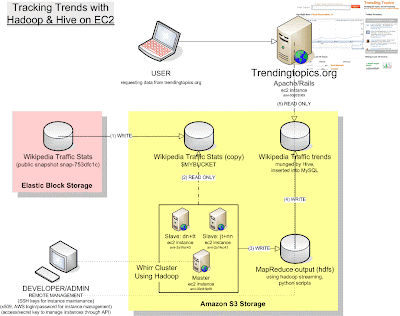
With that baseline set, I will delve into the more technical details of the project implementation in my upcoming posts.
next steps: getting a Cloudera-Hadoop cluster fired up with Whirr and running MapReduce on a dataset.
References
AWS
Hadoop
Hive
MySQL
Whirr
Amazon Public Data Sets
Wikipedia Traffic Statsand Raw Data
1) get a version of TrendingTopics.org site up and running.
2) apply that knowledge to big dataset management tasks back at work
Pete's guide is a fabulous open source resource. However, it has been two years since he wrote the application and a lot of the details about how each piece of software works have changed slightly or have been deprecated. (Funny how web technology techniques become obsoleted in two years!)
Rather than get into the nitty gritty details, I think it would be helpful to take a step back and visualize the architecture that I am trying to replicate as a whole. It is not inconsequential:

With that baseline set, I will delve into the more technical details of the project implementation in my upcoming posts.
next steps: getting a Cloudera-Hadoop cluster fired up with Whirr and running MapReduce on a dataset.
References
AWS
Hadoop
Hive
MySQL
Whirr
Amazon Public Data Sets
Wikipedia Traffic Statsand Raw Data
Subscribe to:
Posts (Atom)